
01
GROUND FORCES
Infantry
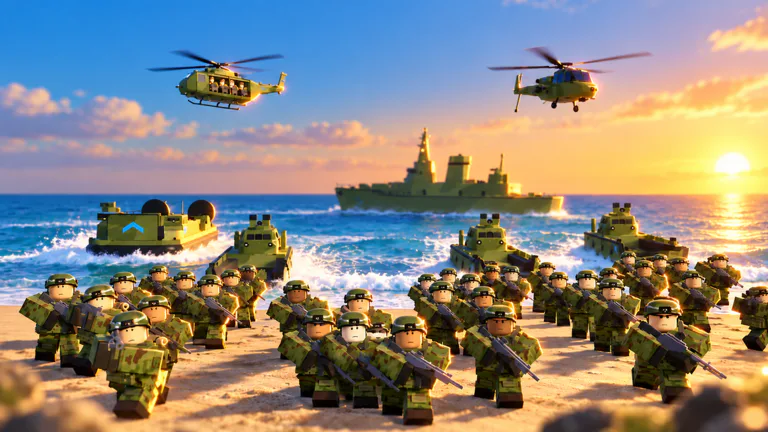
Recruit troops and bring your army onto the battlefield.
INDEPENDENT ROBLOX FIELD GUIDE
Every commander starts with an outpost.
Learn the game. Build your forces. Make your next move.
Build a military base, recruit your forces, and command them in battles over strategic objectives. Get familiar with the systems that connect your outpost to the battlefield.
COMMUNITY GAMEPLAY / Ricoko
Watch community gameplay by Ricoko, then use the field manual to explore the base, army and progression systems. This is a player recording, not an official trailer.
RECENT GUIDE UPDATES
01 / START HERE
A practical introduction to the core loop.
Pick a briefing and read it right here.
YOUR FIRST BRIEFING
Get your bearings before your first deployment. Your base, army and battlefield objectives are all part of the same progression loop.
Read briefingBUILD & EXPAND
Develop a small outpost into a larger military base. Base upgrades and an expanding army sit at the heart of your progression.
Read briefingRECRUIT & UNLOCK
Recruit infantry and work toward tanks, artillery and helicopters. Explore the different military options as they become available.
Read briefingCOMMAND & CAPTURE
Send your forces beyond the base to fight enemy armies and capture strategic points across the map.
Read briefingThe briefings introduce confirmed game systems. Progression suggestions are editorial guidance; unit costs, unlock orders and optimal builds require further gameplay verification.
FIELD MANUAL / GUIDES
Progression
Plan your next session around income, reinforcement speed and useful permanent upgrades. Compare practical progression choices before spending Gold on a temporary advantage or a cosmetic change.
Read guideBeginner
Learn how base construction, recruitment, command orders and income fit together. This beginner briefing introduces the main systems and explains how to choose a useful first purchase.
Read guideArmy
Connect your recruitment choices to troop tents, garages and deployment facilities. Learn how permanent capacity upgrades differ from faster respawns and temporary reinforcement purchases before expanding your force.
Read guideGold
Choose Gold purchases by the problem they solve: income, army capacity, deployment speed or combat equipment. Compare verified store prices and separate permanent upgrades from repeatable battlefield purchases.
Read guideCash
Compare permanent cash multipliers, hand-pump automation and immediate cash purchases. Understand what each option changes before spending Gold to speed up construction or fund your next army upgrade.
Read guideWeapons
Compare the personal weapons listed in the store, from sidearms to heavy launchers. Keep weapon purchases separate from recruited squads and vehicle armaments when planning your combat kit.
Read guideMissiles
Distinguish the Rocket Barrage Launcher from vehicle armaments and temporary support calls. Compare verified store functions and Gold costs without mixing personal equipment with recruited army units.
Read guideEvents
Prepare for the announced Liberty Storm invasion on October 17, 2026. Check the UTC schedule, cooperative battle stages and stated reward conditions before the carrier group reaches the island.
Read guideProgression
Understand the Promotion panel before confirming a reset. A recorded Captain-to-Major example separates permanent gains, rebuilt facilities and retained progress so you can read your own next-rank offer carefully.
Read guideWeapons
Identify the personal weapon labelled Rocket Launcher in gameplay, then distinguish it from the premium Rocket Barrage Launcher. Follow the visible equipment controls without confusing an avatar weapon with a recruited squad.
Read guideCommunity
Find the verified developer community and understand the difference between joining it and claiming an advertised game reward. Check the published offer status before expecting cash, Gold or an automatic payout.
Read guideCommunity
Follow the developer's Discord entry from Army Commander Tycoon's Roblox page. Learn why social links may be hidden and how to keep the correct game identity in view before following an invitation.
Read guideUnits
Looking for the strongest army? Compare the roles advertised for premium units while a strength ranking remains unconfirmed. This first edition separates documented abilities from claims that require combat measurements.
Read guideUnits
Browse seven premium army options confirmed in the developer's Roblox store descriptions. Find their advertised Gold unlock offers, deployment facilities and abilities while keeping unverified combat statistics and cash deployment costs separate.
Read guideUpdates
Check the latest observed Roblox update timestamp, the developer's current update preview and three scheduled events. Released changes, advance announcements and event start times are kept distinct so a timestamp never becomes an invented patch note.
Read guide02 / KNOW YOUR FORCES
Four military categories named in the game.
A starting map of your growing arsenal.
GROUND FORCES
Recruit troops and bring your army onto the battlefield.
ARMORED VEHICLES
Expand your military options with unlockable armor.
HEAVY EQUIPMENT
Discover another branch of your growing military arsenal.
AIRCRAFT
Take your army beyond ground units as you unlock aircraft.
03 / THE BIG PICTURE
Army Commander Tycoon brings military base building and battlefield command together on Roblox. Published by sad builderboy, it puts you in charge of an outpost, a growing army and the next objective on the map.
Progression connects construction, recruitment and combat. Expand your forces to unlock military options including infantry, tanks, artillery and helicopters, while army growth also supports increasing income.
Creation date describes the Roblox experience record, rather than a confirmed public launch date.
04 / QUICK ANSWERS
The essentials, without the guesswork.
Army Commander Tycoon is a military tycoon experience on Roblox. You build and upgrade a base, recruit troops, unlock vehicles and aircraft, and command your army in battles over strategic objectives.
The Roblox experience is published by the sad builderboy creator group. This website is an independent fan guide and is not operated by that group or by Roblox.
Use the Play on Roblox button to open the official Army Commander Tycoon experience page. Roblox handles access to the game and any in-game purchases.
The official description names infantry, tanks, artillery and helicopters, along with other vehicles and aircraft. This overview introduces those categories without claiming a complete unit list or a tier ranking.
Develop your military base, recruit and unlock more forces, and send your army to capture objectives and battle enemies. The official description also identifies increasing income as your army expands.
The official Roblox data lists a maximum of 8 players per server, checked on October 16, 2026. Server capacity may change in a future update.
BRIEFING COMPLETE
Get familiar with the loop, then take command of your own outpost.